
A useful virtual assistant practice project shows what happens between receiving a request and handing back clear work. Build a fictional request desk with a log, a calendar plan, and a concise handoff.
This exercise uses invented information. It is designed to develop organisation and communication skills without accessing a real person’s inbox, calendar, or customer records. You can complete it with a document and a spreadsheet.
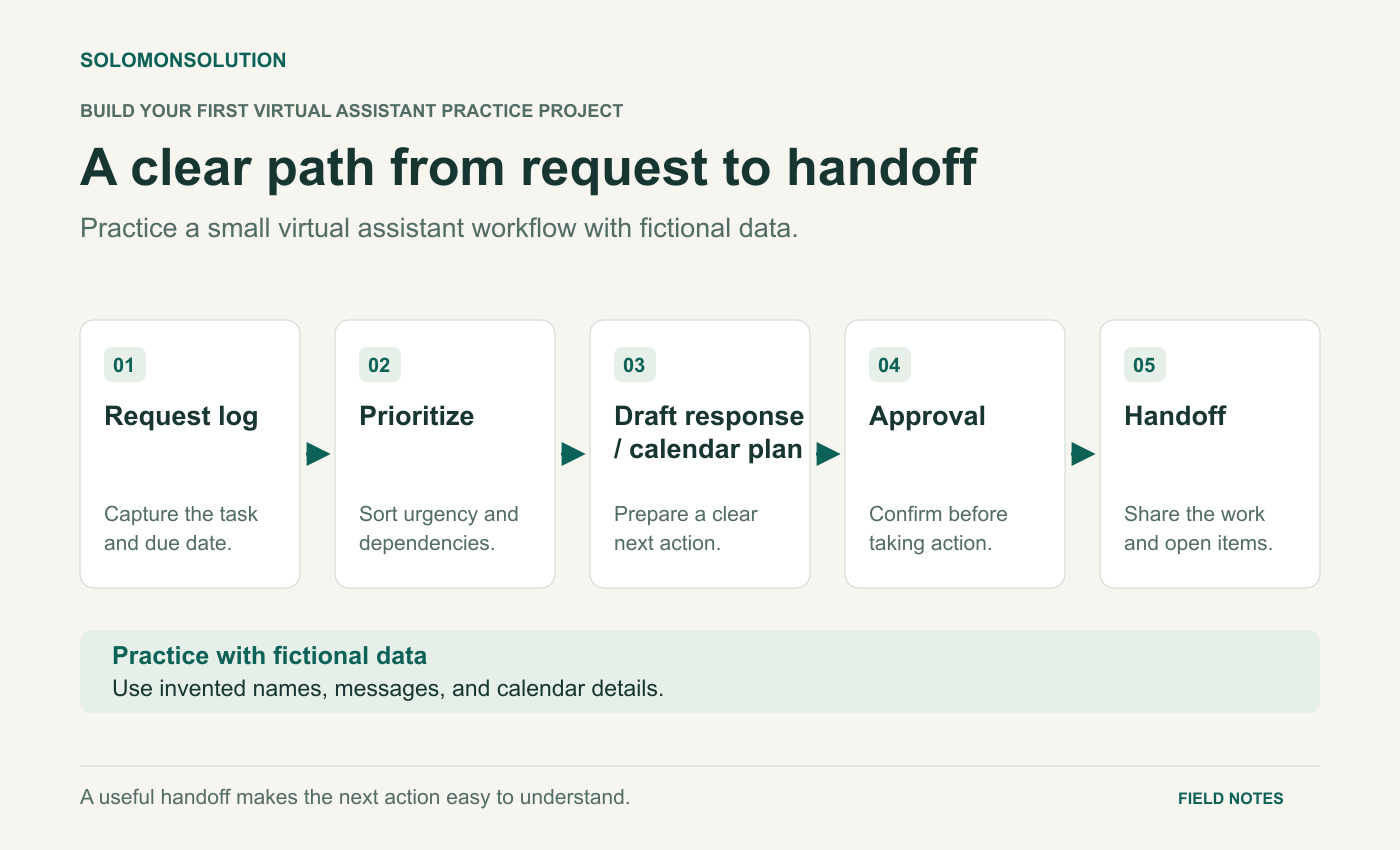
Diagram text description
First, record each request in a request log. Next, sort requests by urgency and dependencies. Draft a response or a calendar plan. Pause at approval so the person responsible can confirm the action. Finish with a handoff that shares the completed work and any open questions. Use fictional names, messages, and calendar details for practice.
1. Set a brief with clear boundaries
Imagine a small training business preparing an online workshop. The organiser needs help sorting requests and preparing a meeting. Your deliverables are a request log, an unsent calendar proposal, three response drafts, and a handoff note.
Use six fictional requests: a speaker asks to change their preparation call; an attendee asks for joining instructions; the organiser asks for a slide deadline; a supplier requests an invoice update; a teammate reports a broken registration link; and a participant asks an accessibility question.
Do not solve every request by guessing. For this exercise, the organiser must approve changes to commitments, payments, public information, and accessibility arrangements. Mark these boundaries in the brief so the reviewer can see when you recognised a decision that belonged to someone else.
2. Turn messages into an actionable log
Create columns for request ID, summary, date received, needed-by date, owner, priority reason, next action, status, and approval needed. Use consistent status labels such as New, Waiting for information, Ready for review, and Complete.
Priority should explain a decision. A broken registration link may deserve attention before a general information request because it blocks sign-ups. An invoice request may need quick acknowledgement but still require the organiser’s approval. Urgency and authority are separate questions.
| Request | Priority reason | Next action | Status |
|---|---|---|---|
| R-01: registration link fails | Blocks access to registration | Record the failing URL and ask the organiser to confirm the correct destination | Ready for review |
| R-02: change speaker call | Needs confirmation before the scheduled call | Offer two proposed times with explicit time zones | Waiting for approval |
| R-03: invoice update | Supplier is waiting for a response | Draft an acknowledgement and request payment status from the owner | Waiting for information |
Make the next action small enough that another person knows what to do. “Handle speaker” is vague. “Ask the organiser to approve one of two call times” tells the next person exactly what is missing.
If you create a Google Form as an optional intake extension, Google lets you choose a linked spreadsheet for its responses. Form and spreadsheet permissions need separate attention when access changes. Keep this practice form private and fill it with fictional requests yourself. Read Google’s response-storage guidance.
3. Prepare a calendar plan that removes ambiguity
Write an event proposal with a clear title, purpose, duration, proposed date, named time zone, participants, and an agenda. Use a placeholder meeting link and label the whole proposal “Draft — approval required.”
For a team working across countries, name the actual zone in the proposal instead of assuming everyone shares “morning.” Google Calendar supports events with a selected time zone and displays events in an invited person’s local time zone. Check the event date and selected city when preparing the proposal. See Google’s time-zone instructions.
Do not calculate a permanent difference between two cities and reuse it indefinitely. Dates and daylight-saving changes can affect the relationship. The exercise should show that you checked the particular proposed date, even if you record the result in a plain document.
If a future client asks you to manage their calendar, request appropriate shared access through the platform. Google provides different calendar permission levels, including visibility and editing options; the owner or administrator controls what can be granted. Review calendar sharing permissions.
4. Write a handoff someone can act on
Your handoff should separate completed preparation, pending decisions, and the next check. Link each decision to its request ID so the organiser can find the supporting detail.
Example practice handoff: The request log contains six fictional requests. Three response drafts are ready for review. R-02 needs approval of a proposed speaker call time; no invitation has been sent. R-03 needs the payment owner’s status update before the supplier response can be finalised. Next check: confirm these two decisions and update the log.
Write the three response drafts in a separate document. Each should acknowledge the request, state what is known, identify any missing information, and explain the next step. Avoid promising a deadline that the brief does not authorise.
5. Review the pack as if you were receiving it
- Every request has an owner or a named decision needed.
- Each priority has a reason.
- Dates and time zones are explicit.
- Drafts agree with the request log.
- Approval boundaries are visible.
- The handoff says what is still pending.
- All data is fictional and the project is labelled accordingly.
Ask a reviewer to identify the two decisions the organiser must make. If they cannot find them quickly, improve the structure before adding more formatting. Present the finished pack as a practice project, with a readable screenshot and a short explanation of your checks.